SubMenu
Problem
Your plugin needs to show additional menu entries in a context menu (e.g. the Spatial menu that appears when you right click on a feature), but you don’t want to modify OpenSphere menu code for your specific case.
Solution
Extend the existing menu with Group, SubMenu and Item elements to provide your plugin specific functionality.
1 2 3 4 5 6 7 8 9 10 11 12 13 14 15 16 17 18 19 20 21 22 23 24 25 26 27 28 29 30 31 32 33 34 35 36 37 38 39 40 41 42 43 44 45 46 | const menu = spatial.getMenu();
if (menu) {
const root = menu.getRoot();
let group = root.find(MYGROUP);
if (!group) {
group = root.addChild({
type: MenuItemType.GROUP,
label: MYGROUP,
tooltip: 'Added by cookbook submenu example',
beforeRender: shouldShowGroup
});
}
const submenu1 = group.addChild({
type: MenuItemType.SUBMENU,
label: 'SubMenu 1'
});
// Submenus can be nested
const submenu2 = submenu1.addChild({
type: MenuItemType.SUBMENU,
label: 'SubSubMenu',
// You can specify child menu items directly
children: [{
type: MenuItemType.ITEM,
label: 'Item 1',
sort: 10,
handler: handleItem1
}, {
type: MenuItemType.ITEM,
eventType: EventType.DO_SOMETHING,
label: 'Item 2',
sort: 30,
handler: handleItem,
beforeRender: visibleIfIsPointInSouthernHemisphere
}]
});
// You can also add items programmatically
submenu2.addChild({
type: MenuItemType.ITEM,
eventType: EventType.DO_ANOTHER_THING,
label: 'Another item',
sort: 20,
handler: handleItem
});
}
|
Discussion
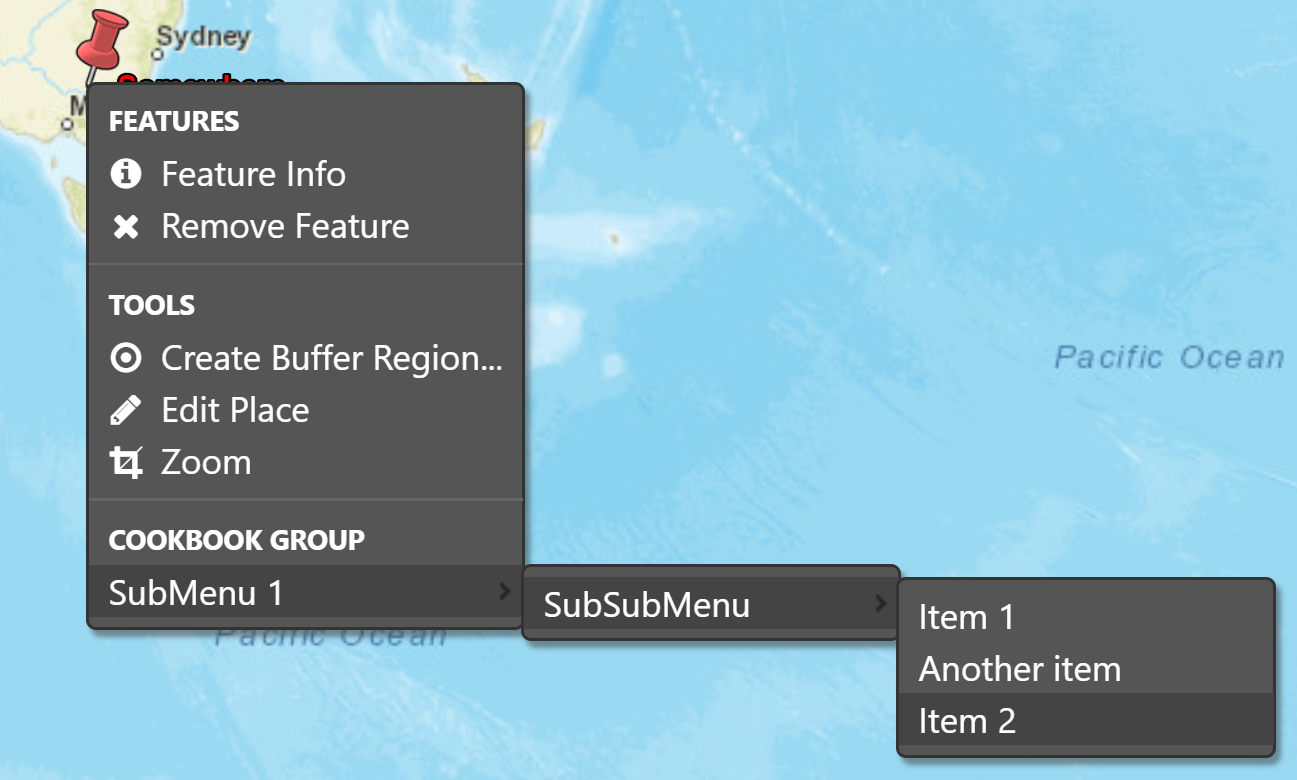
The Spatial menu (os.ui.menu.spatial.MENU) is extensible from plugins. You can then attach groups, separators, submenus and items (plain items, checkboxes, or radio buttons) to the root, or to sub-items. In the image and code, a group item is added to the root, then submenus are nested below that group, and some items are available for selection.
If your plugin has all items known in advance, its possible to use the children property to nest the whole structure, as shown here:
const menu = spatial.getMenu();
if (menu) {
const root = menu.getRoot();
let group = root.find(MYGROUP);
if (!group) {
group = root.addChild({
type: MenuItemType.GROUP,
label: MYGROUP,
tooltip: 'Added by cookbook submenu example',
beforeRender: shouldShowGroup,
children:[{
type: MenuItemType.SUBMENU,
label: 'SubMenu 1',
children:[{
type: MenuItemType.SUBMENU,
label: 'SubSubMenu',
children: [{
type: MenuItemType.ITEM,
label: 'Item 1',
sort: 10,
handler: handleItem1
}, {
type: MenuItemType.ITEM,
eventType: EventType.DO_SOMETHING,
label: 'Item 2',
sort: 30,
handler: handleItem,
beforeRender: visibleIfIsPointInSouthernHemisphere
}, {
type: MenuItemType.ITEM,
eventType: EventType.DO_ANOTHER_THING,
label: 'Another item',
sort: 20,
handler: handleItem
}]
}]
}]
});
}
This is equivalent - you can mix and match the addChild function calls and nested children array as needed.
Note that items will be enabled and visible by default, which might not make sense for your use. Instead, you may want to selectively enable, or not display, some menu items, depending on the menu context. The usual way to do this is to set a beforeRender, as in visibleIfIsPointInSouthernHemisphere which is implemented as:
1 2 3 4 5 6 7 8 9 10 11 12 13 14 15 16 17 18 19 20 21 22 23 24 25 26 27 28 29 | /**
* If our item should be shown.
* @param {Object|undefined} context The menu context.
* @this {os.ui.menu.MenuItem}
*/
const visibleIfIsPointInSouthernHemisphere = function(context) {
this.visible = ifIsPointInSouthernHemisphere(context);
};
/**
* If feature associated with menu entry is a point in southern hemisphere.
* @param {Object|undefined} context The menu context.
* @return {boolean}
*/
const ifIsPointInSouthernHemisphere = function(context) {
// Get feature associated with menu context
const features = spatial.getFeaturesFromContext(context);
if (features.length === 1) {
const feature = features[0];
const geom = feature.getGeometry();
if (geom instanceof Point) {
const coords = toLonLat(geom.getFlatCoordinates(), PROJECTION);
if (coords[1] < 0) {
return true;
}
}
}
return false;
};
|
As the name suggests, one menu entry will only be shown if the feature geometry is a point located in the southern hemisphere (i.e. negative latitude).
Full code
1 2 3 4 5 6 7 8 9 10 11 12 13 14 15 16 17 18 19 20 21 22 23 24 25 26 27 28 29 30 31 32 33 34 35 36 37 38 39 40 41 42 43 44 45 46 47 48 49 50 51 52 53 54 55 56 57 58 59 60 61 62 63 64 65 66 67 68 69 70 71 72 73 74 75 76 77 78 79 80 81 82 83 84 85 86 87 88 89 90 91 92 93 94 95 96 97 98 99 100 101 102 103 104 105 106 107 108 109 110 111 112 113 114 115 116 117 118 119 120 121 122 123 124 125 126 127 128 129 130 131 132 133 134 135 136 137 138 139 140 141 142 143 144 145 146 147 148 149 150 151 152 153 154 155 156 157 158 159 160 | goog.declareModuleId('plugin.cookbook_submenu.CookbookSubmenu');
import {PROJECTION} from 'opensphere/src/os/map/map.js';
import AbstractPlugin from 'opensphere/src/os/plugin/abstractplugin.js';
import PluginManager from 'opensphere/src/os/plugin/pluginmanager.js';
import MenuItemType from 'opensphere/src/os/ui/menu/menuitemtype.js';
import * as spatial from 'opensphere/src/os/ui/menu/spatial.js';
const Point = goog.require('ol.geom.Point');
const {toLonLat} = goog.require('ol.proj');
const {default: MenuEvent} = goog.requireType('os.ui.menu.MenuEvent');
/**
* Cookbook example of a submenu
*/
export default class CookbookSubmenu extends AbstractPlugin {
/**
* Constructor.
*/
constructor() {
super();
this.id = ID;
this.errorMessage = null;
}
/**
* @inheritDoc
*/
init() {
    const menu = spatial.getMenu();
    if (menu) {
      const root = menu.getRoot();
      let group = root.find(MYGROUP);
      if (!group) {
        group = root.addChild({
          type: MenuItemType.GROUP,
          label: MYGROUP,
          tooltip: 'Added by cookbook submenu example',
          beforeRender: shouldShowGroup
        });
      }
      const submenu1 = group.addChild({
        type: MenuItemType.SUBMENU,
        label: 'SubMenu 1'
      });
      // Submenus can be nested
      const submenu2 = submenu1.addChild({
        type: MenuItemType.SUBMENU,
        label: 'SubSubMenu',

        // You can specify child menu items directly
        children: [{
          type: MenuItemType.ITEM,
          label: 'Item 1',
          sort: 10,
          handler: handleItem1
        }, {
          type: MenuItemType.ITEM,
          eventType: EventType.DO_SOMETHING,
          label: 'Item 2',
          sort: 30,
          handler: handleItem,
          beforeRender: visibleIfIsPointInSouthernHemisphere
        }]
      });

      // You can also add items programmatically
      submenu2.addChild({
        type: MenuItemType.ITEM,
        eventType: EventType.DO_ANOTHER_THING,
        label: 'Another item',
        sort: 20,
        handler: handleItem
      });
    }
}
}
/**
* @type {string}
*/
const ID = 'cookbook_submenu';
/**
* @type {string}
*/
const MYGROUP = 'Cookbook Group';
/**
* Our event types
* @enum {string}
*/
const EventType = {
DO_SOMETHING: 'cookbook:do_y',
DO_ANOTHER_THING: 'cookbook:do_x'
};
/**
* If our example group should be shown.
* @param {Object|undefined} context The menu context.
* @this {os.ui.menu.MenuItem}
*/
const shouldShowGroup = function(context) {
// This shows always, and could just be omitted from the menu item definition.
// Your code could use the menu context if needed.
this.visible = true;
};
/**
 * If our item should be shown.
 * @param {Object|undefined} context The menu context.
 * @this {os.ui.menu.MenuItem}
 */
const visibleIfIsPointInSouthernHemisphere = function(context) {
  this.visible = ifIsPointInSouthernHemisphere(context);
};

/**
 * If feature associated with menu entry is a point in southern hemisphere.
 * @param {Object|undefined} context The menu context.
 * @return {boolean}
 */
const ifIsPointInSouthernHemisphere = function(context) {
  // Get feature associated with menu context
  const features = spatial.getFeaturesFromContext(context);
  if (features.length === 1) {
    const feature = features[0];
    const geom = feature.getGeometry();
    if (geom instanceof Point) {
      const coords = toLonLat(geom.getFlatCoordinates(), PROJECTION);
      if (coords[1] < 0) {
        return true;
      }
    }
  }
  return false;
};
/**
* Process a menu item
* @param {MenuEvent} event The menu event.
*/
const handleItem1 = function(event) {
alert('cookbook_submenu item1 selected');
};
/**
* Process a menu item
* @param {MenuEvent} event The menu event.
*/
const handleItem = function(event) {
// event provides context for the elected item
const eventType = event.type;
alert('cookbook_submenu item selected:' + eventType);
};
// add the plugin to the application
PluginManager.getInstance().addPlugin(new CookbookSubmenu());
|